Primary topic Mobile Web
A web page used to look like a small program with a reassuringly linear life. It loaded, it ran, and eventually it unloaded. That last step appeared to give developers a place to save a draft, send analytics, close a connection or mark a session as finished.
Mobile operating systems made that story difficult to defend. A browser can move into the background, have its processes suspended, and later lose them under memory pressure without ever returning control to the page. Back/forward caches complicate the model in another direction: navigating away may not destroy the document at all. The browser may freeze the whole page and bring it back with its DOM and JavaScript state intact.
Chrome’s current deprecation of unload matters, but mostly because it formalizes what mobile developers have had to learn for years: an application cannot assume that it will observe its own termination.
That constraint now belongs to the modern mobile web platform. For the earlier strategic context, the archive’s native-versus-web application-platform debate shows how MobileTech framed reach and distribution before lifecycle resilience became a first-class concern.
Why unload once made sense
The original document model was easy to understand. A new document replaced the old one. load was a setup point; unload was a teardown point. On desktop browsers, where a visible page often remained attached to a long-lived browser process until a deliberate navigation or window close, that model worked often enough to become habit.
Developers used the event for several very different jobs:
- sending end-of-visit analytics;
- saving form values, draft text or application state;
- closing sockets and other resources;
- telling a server that a session had ended;
- performing library or component cleanup.
The problem was not that all of these needs were imaginary. The problem was that they were bundled behind one ambiguous idea: “the user is leaving.”
Leaving can mean a same-tab navigation, a reload, closing one tab, closing the browser, switching to another app, losing the browser process, or having the operating system kill that process later. Early web code routinely treated these as variations of the same transition. They are not.
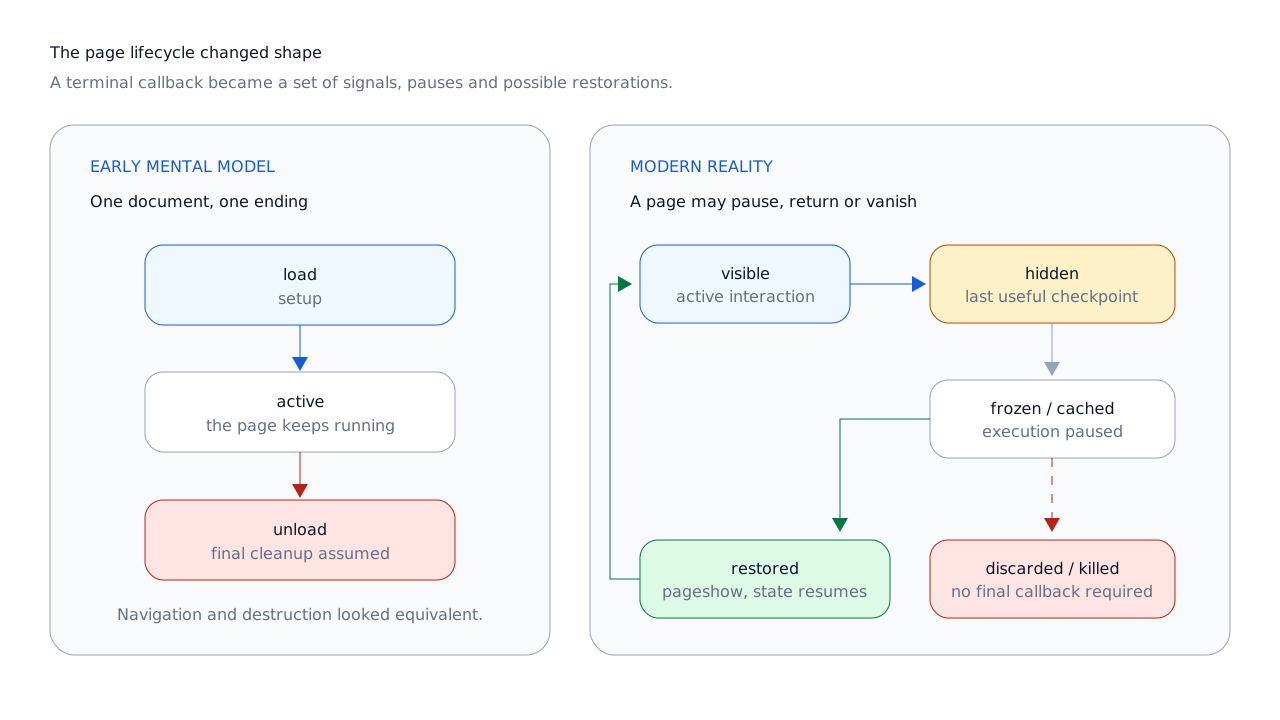
unload therefore offered a practical behavior and an architectural illusion at the same time. It encouraged application logic to wait until the last possible moment, even though that moment was never under the page’s control.
Mobile broke the terminal-callback model
A phone cannot keep every background application fully alive. Memory is limited, battery is limited, and the operating system has stronger priorities than preserving a callback for a hidden browser tab. Android documents that cached and background processes may be killed to reclaim memory; Apple’s lifecycle guidance likewise treats background execution and later suspension or termination as normal resource-management behavior.[16][17]
Consider a common sequence:
- A user opens a page and starts writing.
- The user switches to a messaging or camera app.
- The browser moves into the background.
- Memory pressure increases later.
- The operating system removes the browser process.
There is no useful instant between steps four and five when the hidden page can be woken up and politely told to finish its JavaScript. Once the process is gone, it is gone. unload, beforeunload and even pagehide may never run in this scenario.[12][13]
This was sometimes described as mobile browsers being unreliable. A more useful reading is that mobile browsers exposed a systems principle that desktop web development had managed to ignore: no application controls its own termination.
The same pressure is no longer confined to phones. Desktop browsers suspend background work, freeze eligible tabs and discard documents to reduce CPU, memory and energy use. Mobile did not create every lifecycle mechanism now used on the web, but constrained devices made the old assumption fail earlier and more visibly.[9]
Back/forward cache made “leaving” non-terminal
Back/forward cache, usually shortened to bfcache, is not the HTTP cache. The HTTP cache stores responses and resources that can be reused during a new load. Bfcache keeps an entire document alive in memory: the DOM, JavaScript heap and much of the page’s runtime state are preserved while execution is paused. A history navigation can then restore that page instead of rebuilding it from HTML, CSS and JavaScript.[15]
This is an old idea. WebKit says its Page Cache was built in 2002, before the first Safari beta. Mozilla documented whole-page in-memory caching, including preserved JavaScript state, in Firefox 1.5. WebKit added pageshow and pagehide in 2009, explicitly crediting Mozilla’s earlier solution.[4][5][6]
The mechanism creates an unavoidable conflict with unload.
If the browser fires unload before placing a page in bfcache, the handler may perform destructive teardown: close connections, remove state, detach components or tell a server that the session is over. The page is then restored in a state its own code declared terminal.
If the browser does not fire unload, the page can be cached safely, but the callback is no longer dependable. Firing it later, when an invisible cached page is finally evicted, would mean unexpectedly waking old script that the user left minutes ago. WebKit’s engineers described this exact dilemma in 2009. The core conflict has not changed.[5]
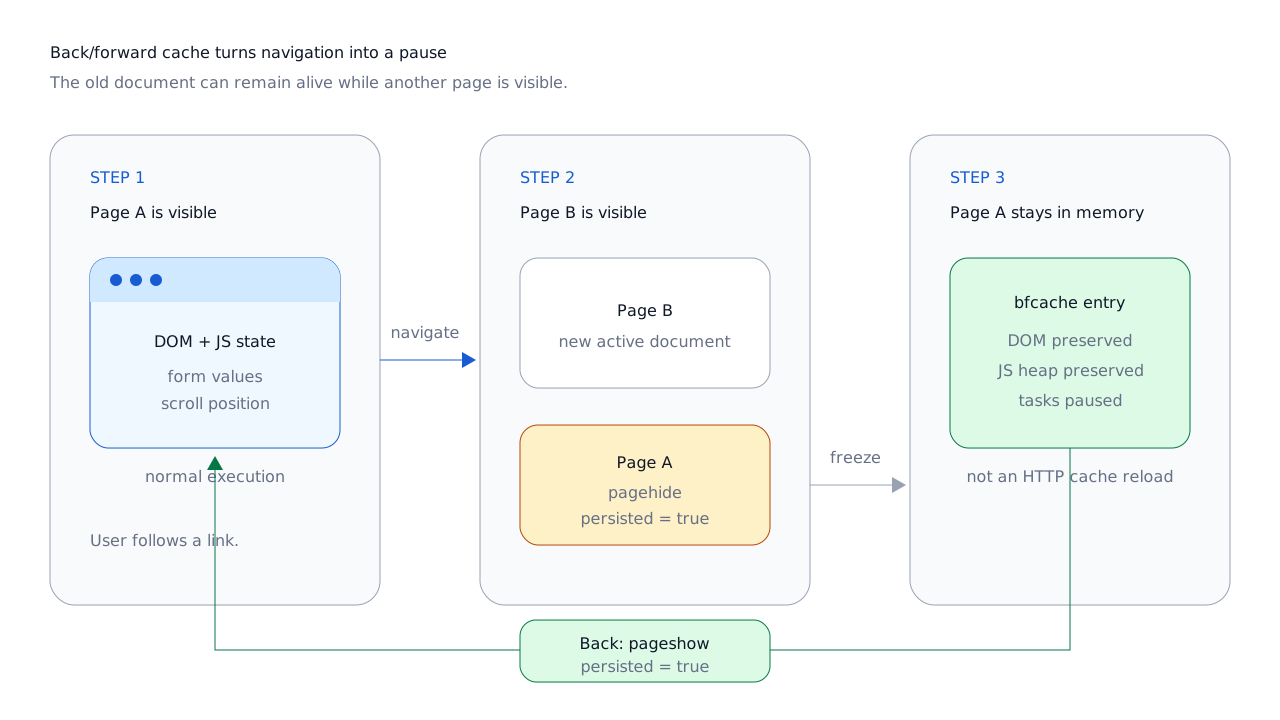
Browsers historically resolved the conflict in different ways. Some excluded pages with unload listeners from bfcache. Others prioritized bfcache and skipped the handler on relevant navigations. Either choice weakens the idea that unload is both reliable and compatible with fast history restoration.
A Chromium Permissions Policy explainer reported internal telemetry in which an unload handler somewhere in the frame tree was the only bfcache blocker for 16% of history navigations. That is vendor telemetry from a particular implementation, not a measurement of the whole web, but it shows why removing an apparently harmless listener can affect a meaningful share of return navigations.[20]
The performance benefit is direct. A restored page does not have to repeat its normal network, parse, style, layout and JavaScript startup work. That can make back and forward navigation feel nearly immediate, which matters particularly on mobile hardware and variable networks.
The modern signals: visibility, pagehide and pageshow
The platform did not replace unload with one equally final event. It split the problem into signals that answer narrower questions.
Page Visibility: can the user currently see this document?
document.visibilityState distinguishes at least visible and hidden, and visibilitychange fires when that state changes. A page can become hidden because the user changed tabs, minimized the browser, navigated, locked the screen or switched away from the browser app.
On mobile, the transition to hidden is often the last state change a page can reliably observe. That makes it a good checkpoint for saving important user state and flushing non-blocking analytics.[7][9]
But hidden does not mean “about to die.” The user may return a second later. The page may remain hidden for hours. It may be frozen, cached, discarded or left alone. Visibility is a signal about presentation, not a termination guarantee.
function checkpoint() {
  persistDraft();
  flushAnalytics();
}

document.addEventListener('visibilitychange', () => {
  if (document.visibilityState === 'hidden') {
    checkpoint();
  }
});

window.addEventListener('pagehide', checkpoint);
Both events may fire during the same navigation, so the work should be idempotent. The goal is not to predict the exact end of a session. It is to move important work earlier, while execution is still available.
pagehide: is this document being left through navigation?
pagehide is navigation-aware. It can fire when a document is replaced, reloaded or closed, and it is compatible with bfcache. Its persisted property tells the page whether the user agent may preserve the document for reuse. In the current HTML definition, true means the page might be reused if it remains salvageable; it is not a promise that the user will return.[3]
It is useful when the application needs to distinguish a navigation away from a mere tab switch. It is still not a universal “last chance” event: a page that goes into the background and is killed later may never receive it.[13]
pageshow: was this document restored?
pageshow runs on the initial presentation and after a bfcache restoration. When event.persisted is true, the page is returning with preserved runtime state rather than starting from a normal reload.
window.addEventListener('pagehide', () => {
  pauseLiveUpdates();
});

window.addEventListener('pageshow', event => {
  if (event.persisted) {
    refreshTimeSensitiveData();
  }

  resumeLiveUpdates();
});
This restoration path is easy to overlook. A page can return with old timestamps, stale authentication assumptions, an expired API result or a connection that no longer exists. The correct response is usually selective revalidation, not a forced reload that throws away the benefit of bfcache. At product level, this is a mobile UX problem of interruption and recovery as much as a browser API problem.
There is no single interoperable Page Lifecycle API
“Page lifecycle” is useful terminology, but it can imply more standardization than the platform currently provides.
Some pieces are established web-platform APIs: Page Visibility, pagehide, pageshow, beforeunload, unload, Beacon and Fetch. The HTML Living Standard defines the page-transition events and their persisted state.[3]
The familiar state diagram containing active, passive, hidden, frozen, terminated and discarded is largely associated with Chrome guidance and the WICG Page Lifecycle proposal. It is a valuable model of browser behavior, but not one fully interoperable API that applications can use identically in every engine.[9][10]
That distinction matters. Chrome exposes lifecycle-related mechanisms such as freeze, resume and document.wasDiscarded. Developers can progressively enhance around them, but should not build a cross-browser correctness requirement on Chromium-only hooks.
Analytics after unload
Analytics helped make exit handlers sticky. An end-of-session batch seemed efficient, and blocking the next navigation with synchronous XHR improved delivery rates. It also delayed the user, consumed scarce mobile resources and still could not solve process termination.
The Beacon API was designed for small, asynchronous, non-blocking reports. The user agent queues a request with Fetch’s keepalive flag, and the specification tells it to schedule pending beacons when the document becomes hidden. navigator.sendBeacon() returns true when the data was accepted into the queue, not when the server received it.[11]
function flushAnalytics() {
  const events = readPendingEvents();

  if (events.length === 0) {
    return;
  }

  const body = JSON.stringify(events);
  navigator.sendBeacon('/analytics', body);
}
That last distinction is important. Beacon improves the chance that a small report can continue without blocking navigation, but it is not a guaranteed delivery system. A device can lose connectivity. A process can be killed before a request is queued. The browser can reject an oversized batch. The server can fail after the client has moved on.
fetch() with keepalive: true is the more flexible option when code needs custom headers, methods or other Fetch behavior. It is still subject to normal Fetch and CORS rules, and keepalive request bodies are deliberately limited; current Fetch semantics cap the aggregate queued body size at 64 KiB.[18]
For ordinary analytics, a sensible pattern is to send data periodically or after meaningful events, then make one last best-effort flush on visibilitychange when the page becomes hidden. For information that the product cannot afford to lose—a payment, a saved document, a security action—the application should obtain an explicit server acknowledgement while it is active. Analytics transport is not a transaction protocol.
State persistence and the narrow role of beforeunload
User state should not accumulate in memory until a theoretical exit. Drafts and client-side edits are safer when persisted on meaningful changes, with debouncing to control write frequency, plus a visibility-loss checkpoint. The exact storage layer depends on the application: a small preference may fit in localStorage; structured offline data generally belongs in IndexedDB; authoritative records should be confirmed by the server.
This is less dramatic than a final save callback, and that is the point. Durability works better as an ongoing property than as an emergency action.
Session termination needs the same rethink. A server should not rely on a browser page to announce that a person has “left.” Tabs crash, networks vanish and devices sleep. Expiry, revocable credentials, server-side session state and, where appropriate, heartbeats are better foundations than an exit beacon.
When beforeunload is still appropriate
beforeunload is not a drop-in replacement for unload. Its legitimate use is much narrower: asking the browser to warn a user who is about to abandon unsaved work.
Modern browsers require prior user interaction before showing the dialog, display browser-controlled generic text, and may not fire the event on mobile when the browser is killed from the background. Firefox also excludes pages with beforeunload listeners from bfcache. The listener should therefore exist only while the page is genuinely dirty, and be removed as soon as the work is safe.[12]
function warnAboutUnsavedChanges(event) {
  event.preventDefault();
  event.returnValue = '';
}

function setDirty(isDirty) {
  const method = isDirty ? 'addEventListener' : 'removeEventListener';
  window[method]('beforeunload', warnAboutUnsavedChanges);
}
The dialog is a user-facing safety net, not a persistence mechanism. The application should already be saving what it can.
Resource cleanup without a final callback
“Close everything in unload” sounds disciplined, but it combines resources with very different lifetimes. The better question is what must happen while the page is still observable, what must be reversible after restoration, and what the browser can reclaim by destroying the process.
- Durable application data
- Commit it as part of the user action or shortly afterward. An IndexedDB transaction should not depend on a final page event to become meaningful.
- User-sensitive capture
- Camera, microphone and screen-capture tracks should follow explicit product and visibility rules. Stop them when the user should reasonably expect capture to end, not merely because a document might be destroyed.
- Long-lived connections
- WebSockets and WebRTC sessions may need to pause, close or reconnect depending on the product. Any action taken on
pagehidemust account for the possibility of a laterpageshow. - Cross-context coordination
- Web Locks, BroadcastChannel messages and worker coordination should tolerate a participant disappearing without a farewell message. Reacquire or resynchronize when the page becomes active again.
- Timers, observers and background work
- Assume they can be throttled, frozen or terminated. Pause work that has no value while hidden, but do not treat a timer callback as evidence that the page will remain alive.
Bfcache eligibility rules for particular APIs also evolve as engines learn to suspend them safely. A static list copied into application architecture will age badly. Test the actual page, inspect current browser diagnostics, and keep correctness independent from whether the browser chooses to cache, freeze or destroy it.
Browser differences still matter
The direction of travel is shared, but the details remain engine-specific.
WebKit and Safari
WebKit has unusually long historical memory here. Its engineers were documenting the conflict between unload handlers and the Page Cache in 2009, and the cache itself predates Safari’s first public beta. WebKit’s solution was to make navigation suspendable and to use pagehide/pageshow for state that can be left and restored.[4][5]
Current compatibility guidance describes Safari as prioritizing its page cache over firing unload in relevant cases. That is good for history-navigation performance and another reason not to treat observed desktop behavior in one engine as a cross-browser guarantee.[19]
Gecko and Firefox
Firefox’s bfcache lineage is also early. Mozilla’s Firefox 1.5 documentation explains that entire pages, including JavaScript state, could be kept in memory, and introduced pageshow/pagehide as the way to cooperate with that model.[6]
On current Firefox, unload listeners can still prevent bfcache use, and MDN documents the same issue for beforeunload. That makes conditional listener registration particularly important.[12][19]
Chromium and Chrome
Chromium came later to broad bfcache deployment and spent years on compatibility work and outreach. Chrome’s unload deprecation now flips the old desktop tradeoff: instead of sacrificing bfcache to preserve a callback that was already unreliable on mobile, Chrome is progressively making the callback disabled by default.[1]
Chrome also has the richest current diagnostics, including a DevTools bfcache test and PerformanceNavigationTiming.notRestoredReasons. That API shipped in Chrome 123 and can expose blocking reasons such as an unload listener, including reasons found in same-origin frames. It should be treated as a Chromium diagnostic, not assumed to exist everywhere.[14]
The common baseline is still useful: Page Visibility and the page-transition events are broadly implemented. The edges—what blocks bfcache, which resources can be frozen, whether an exit event fires, and which diagnostics are exposed—must be tested per engine and device class.
What Chrome is changing in 2026
Chrome is not simply deleting the unload property in one release. It is changing the default behavior in stages so that registered handlers stop firing unless the page has opted back in.
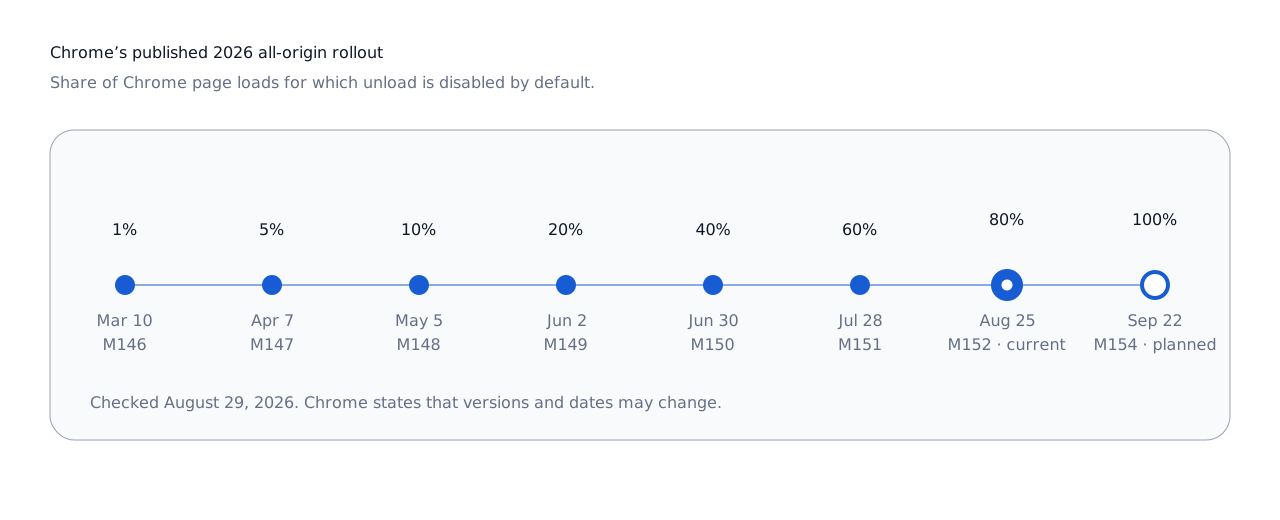
The rollout follows earlier work on the top 50 sites during 2025. For all other origins, Chrome’s published 2026 stages are:
- : 1%
- : 5%
- : 10%
- : 20%
- : 40%
- : 60%
- : 80%
- : planned 100%
Sites can currently control the transition with the unload Permissions Policy. A site that has removed its dependency can disable the event deliberately with:
Permissions-Policy: unload=()A top-level document that needs temporary compatibility can opt back in with:
Permissions-Policy: unload=selfCross-origin frames need compatible policy declarations through the ancestor chain and appropriate iframe permissions. Chrome also provides enterprise policy and local testing flags. These are migration controls, not a new reliability guarantee: opting in does not make the event dependable on mobile.[20]
Chrome says its long-term aim is to remove unload, but the published schedule covers staged changes to whether handlers fire by default. It does not schedule physical removal of the API.[2]
How to audit an unload dependency
Start by finding the dependency, including code you did not write. Search first-party source, compiled bundles, tag-manager output and third-party frames for unload, onunload and unconditional beforeunload registration.
Then test behavior rather than stopping at source search:
- Use Chrome DevTools’ Application → Back/forward cache test.
- Navigate away and back, then inspect
pageshowandevent.persisted. - Collect field diagnostics with
notRestoredReasonswhere Chromium support is acceptable. - Use a report-only unload Permissions Policy to discover attempted registrations before enforcing the policy.
- Repeat the test in Safari and Firefox, on desktop and mobile hardware.
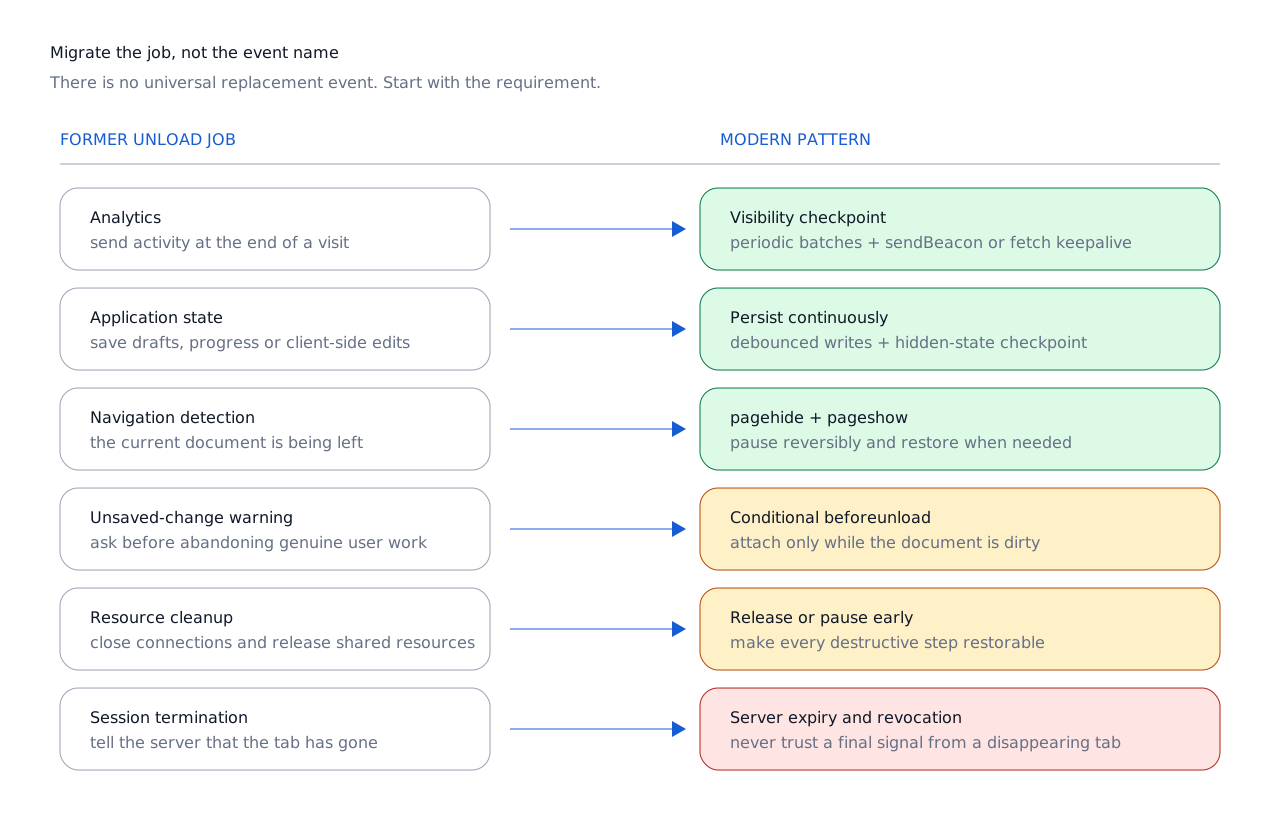
Analytics
Batch during the session and make a best-effort Beacon or Fetch keepalive flush when visibility becomes hidden. Do not promise delivery that the transport cannot guarantee.
State saving
Persist on meaningful changes, debounce routine writes, and checkpoint on visibility loss. Treat server acknowledgement as the authority for critical records.
Navigation detection
Use pagehide. If the page changes resources or pauses work, add a corresponding pageshow restoration path.
Unsaved-change warning
Register beforeunload only while unsaved user work actually exists, and remove it immediately after saving.
Resource cleanup
Decide whether the resource needs early release, reversible suspension or no script cleanup at all. Test current bfcache behavior instead of relying on old blocker lists.
Session termination
Move authority to the server: expiry, revocation, acknowledgement and resilient presence logic. A disappearing tab cannot be a trusted logout signal.
MobileTech’s 2026 homepage audit examined startup weight, JavaScript and third-party pressure. Bfcache affects a different phase—return navigation—but reinforces the same architectural point: application-like pages need explicit lifecycle design as well as a fast initial load.[21]
From document teardown to application resilience
The deprecation of unload is easy to frame as browser housekeeping. That misses the larger change.
The early web inherited a document lifecycle: load the page, use it, tear it down. The modern web increasingly behaves like an application platform running inside another application, under an operating system that may pause, cache, discard or kill it. Navigation itself may preserve the document rather than destroy it.
So the platform’s advice has moved earlier. Save state while the page is still visible or when it first becomes hidden. Send analytics without blocking the next action. Treat navigation as potentially reversible. Restore time-sensitive state when a cached page returns. Use beforeunload only when the user genuinely needs a warning.
The page may receive another event. It may come back exactly where it was. Or it may disappear without one last line of JavaScript.
That is not a lifecycle edge case anymore. It is the lifecycle.