
Primary topic Mobile SEO
On November 9, 2026, Google confirmed support for “things to do” queries in two search features for the European Economic Area: the aggregator unit and the supplier unit. For activities, tours and events, a marketplace can apply to submit listings to the aggregator unit. A museum or tour operator can qualify for the supplier unit through its own website. If you run the activity yourself, check the page people land on before you budget for a feed.
The location that matters is the searcher’s. The EEA covers 30 countries: the EU member states plus Iceland, Liechtenstein and Norway. The UK and US are outside these units’ documented coverage. A business based there can still serve EEA users, so checking from head office may miss the layout your customers see.
| Site | First action |
|---|---|
| Museum’s own tickets | Supplier: check your ticket page |
| Tour marketplace | Aggregator: check feed eligibility |
| City guide | Web search: keep activity links |
| US-only operator | Outside EEA: keep current setup |
What a customer sees in the two units
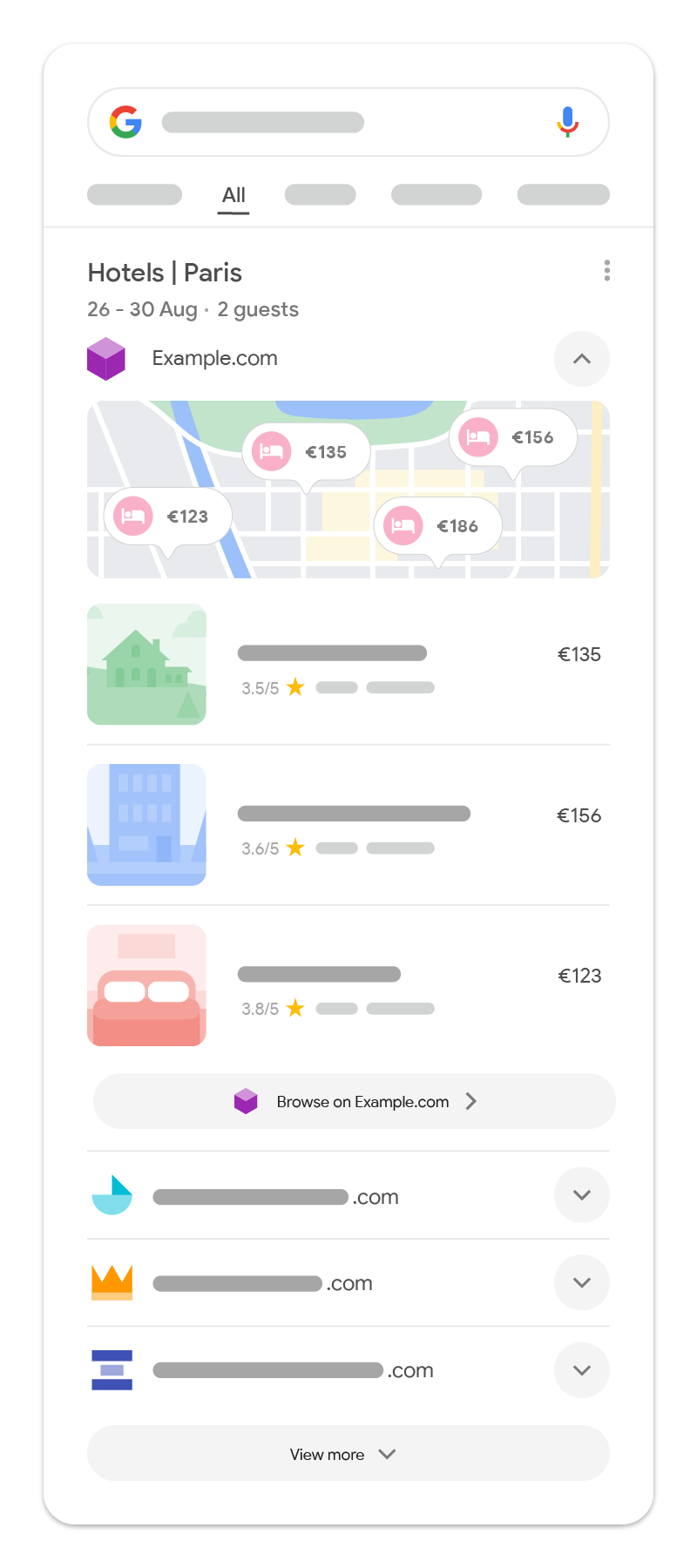
The official aggregator example uses Paris hotels. On the phone mock-up, the top-ranked provider, Example.com, opens by default. Its cards show hotels with prices and ratings, while the other provider choices are collapsed below. Pick an alternative, if there is one, and its inventory opens in the same unit. A click goes to the page supplied by that aggregator. For the hotel, that click is a referral opportunity through the marketplace. The hotel’s own landing page is a separate result.
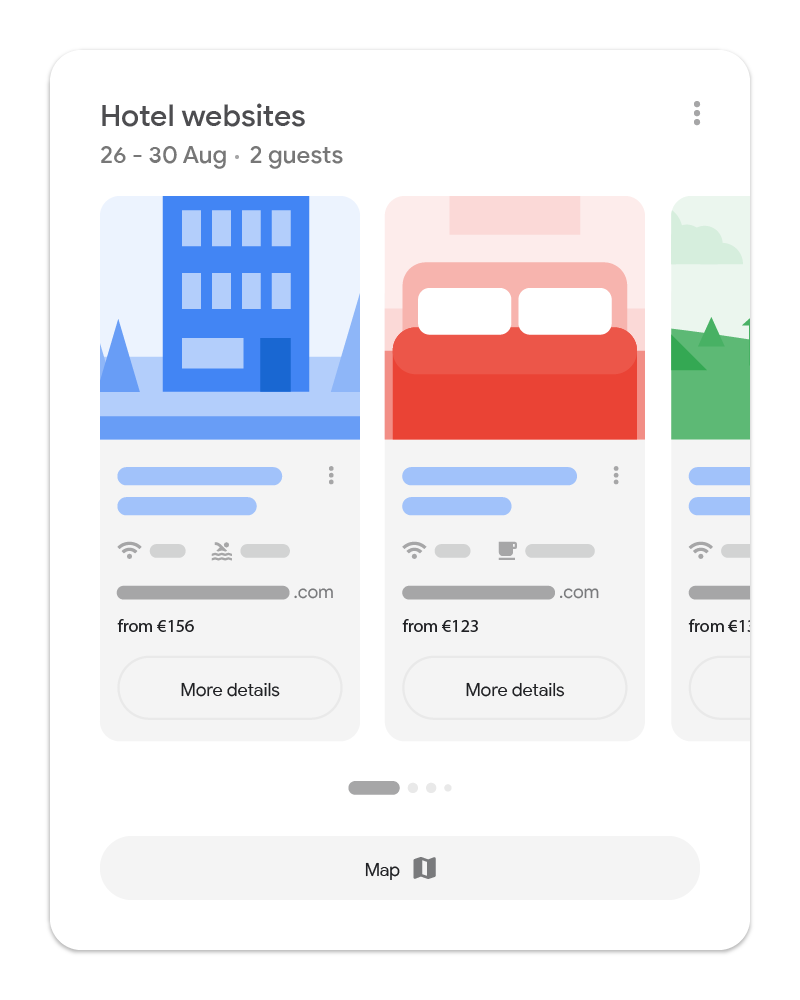
The supplier illustration shows a separate set of cards headed “Hotel websites.” That is the part for direct providers. Think of a walking tour sold by both a marketplace and the guide who runs it. The two units offer different routes: through an intermediary or through a direct provider. These hotel illustrations show the layout rather than a live activity search.
If you run the activity, start with your own page
A direct provider serving EEA users needs no separate application or additional data beyond what Google can crawl to be eligible for the supplier unit. Optional feeds can enrich results where supported. For a museum or tour business, the public activity page is the participation route. Optional enrichment can wait until a supported integration solves a specific need.
Start with an activity people can book. A guided museum visit needs a page that identifies the visit, explains where it starts and what the ticket includes, and lets customers check dates. Keep those details public even if availability comes from a booking engine. A Book button that opens a generic calendar and forgets the chosen visit wastes that referral.
In Search Console’s URL Inspection, check Page indexing for the Google-selected canonical. Fix it if Google has selected an unintended page. Then run Test live URL and open View tested page to inspect the rendered offer. Canonical selection belongs to the indexed report; the live test checks the current page and cannot predict which canonical Google will select.
A €25 museum visit: which problem should you fix?
Take a hypothetical Paris museum selling its own guided visit for €25. Its public visit page is indexed under the intended canonical. A mobile search sample taken in France shows an aggregator unit but no card for the museum. The museum meets the business-role and audience requirements, but that does not guarantee a card. Buying an aggregator-feed integration is the wrong first response for this direct supplier.
Now follow the museum’s booking button on a phone. Suppose the visit page shows €25, but the booking engine opens a €40 private-tour product. Fix that product mapping first: the broken journey is observable and affects visitors however they arrive. If the correct €25 visit opens with the chosen language and date intact, keep monitoring search appearances rather than rebuilding a working booking path.
If you run a marketplace, ask about approval before building
Marketplaces, online travel agencies, comparison services, metasearch engines and directories use the aggregator route. Begin with the Google Search Aggregator Features interest form and confirm eligibility before assigning a feed build. Participation requires VSS approval, relevant inventory, the required data and compliance with Search content policies. The Local integration also expects an aggregator with direct contractual merchant relationships; a few affiliate links do not establish that relationship.
Local businesses, things to do and lodging use direct data feeds; flights and long-distance transport use real-time APIs. An activity marketplace should follow the POI route. Existing Things to Do booking inventory is a separate integration: the Actions Center catalog lists bookings and Local & Things to Do in the EEA separately.
Match the place, then check the destination
The POI specification requires poi_id, name, location, category and matching category-specific data. Its restaurant example uses test_restaurant_1 with category: LOCAL and local_data. The top-level url matches the entity; destinations live under local_data.brand_landing_pages, with required brand_id and default_url. Optional localized_landing_pages pair URLs with language tags. Check those fields if the wrong language opens.
Validate before upload. Send one JSON file containing all entities as a daily full refresh over SFTP; gzip is recommended. Keep each entity’s translations together, with default_locale present in localizations. Do not split the archive into country files. In the Partner Portal, use Configuration > Feeds for SFTP details and Ingestion > History for processing status. A successful upload still needs ingestion checks.
Use the sandbox and production review stages to verify matching and destinations before launch. Start with a representative sample, including a multilingual entity, then build the complete refresh. A feed record represents a place, and its brand landing page determines the onward route; neither is proof of exposure for a particular search.
Once records match, supply details that help someone choose: a precise category, descriptions, hours, relevant amenities and original photos. Include verified ratings and their counts where available. Use factual, descriptive titles in title case, avoiding all caps, excessive punctuation, emoji and promotions such as “BEST DEALS.” Keep prices and availability aligned with the landing page and remove expired offers. These are aggregator quality practices, not a promise of placement.
How to tell a search change from a booking problem
Pick a few non-branded queries for the activities that matter to you and keep the list stable. Have someone in the target EEA market capture the mobile result with the country, language, device, timestamp and who or what collected it. Keep each market in a separate view before combining totals. Record whether you saw an aggregator unit, which provider was open, and whether the supplier unit appeared. If you can identify only a generic carousel, record it that way. Save branded queries separately so a shift in activity discovery does not get hidden by people searching for your name.
In Search Console, look at mobile clicks and impressions for the same country and landing pages. As a starting point, compare consecutive 28-day windows with the same query set, then check seasonal demand and your own site changes before attributing a movement to these units. Keep rank in the report, but average position doesn’t tell you how far a customer had to scroll. Match that evidence with mobile bookings. If clicks hold up but bookings fall, replay the ticket journey before blaming the layout. If the booking happens on a separate domain or after a consent step, test tracking across the whole journey before reading the drop as lost sales.
What November 9 changes, and when to wait
November 9, 2026 dates the explicit confirmation of activity support in these two units. The broader EEA search redesign began earlier: the February 15, 2024 announcement tied new search experiences to preparations for the Digital Markets Act. That post’s interest-form list now includes events, tours and activities, but the list and supported query types were updated on April 10, 2025.
The 2026 documentation sequence is September 8 for regional search experiences covering hotels, flights, long-distance trains or buses and products; September 18 for local businesses; and November 9 for things to do. Those dates identify documentation changes, not the first impression of every result. There is no query-by-query appearance schedule or stated mobile browser/version requirement in these guides.
At the next check, repeat the same queries in the same market and save the result beside today’s sample. If the units appear, follow the actual links and compare the destination with the advertised offer. If they remain absent and your page works, keep monitoring; a site rebuild has no observed search problem to solve.